PTO (Optical Terminal Outlet): complete guide to the Optical Termination Point in FTTH
Contents
What is a PTO ?
The Optical Terminal Outlet (PTO), also known as the Optical Termination Point or — in recent pre-equipped dwellings — the Optical Indoor Termination Device (DTIo), is the wall-mounted box that marks the boundary between your operator's fiber optic network and the home network of your dwelling. It is the point where the external fiber connects to your Internet equipment.
In practice, the PTO comes as a small white box fixed to the wall (often in a utility room, an entrance hall or a closet), fitted with one or more SC/APC sockets (green connector). It is what makes your FTTH (Fiber To The Home) subscription effective inside the dwelling.
Without a functional and correctly connected PTO, no Very High Speed Internet access is possible over fiber optic — even if the fiber cable is run up to the foot of the building.
The PTO's place in the FTTH network
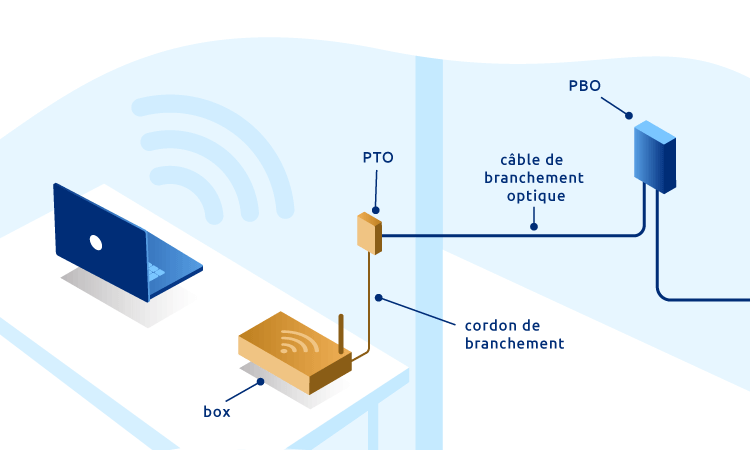
To understand the role of the PTO, you need to picture the optical distribution chain from the operator's exchange all the way to your Internet box. Each link plays a specific role:
- NRO (Optical Connection Node): operator's exchange where the fibers of a geographic area are concentrated.
- PM (Pooling Point): street cabinet that dispatches fibers between operators and buildings.
- PBO (Optical Connection Box): landing box in buildings or outdoor box in detached houses.
- PTO: your wall outlet — the last passive element of the operator network.
- ONT (Optical Network Termination): active equipment (often built into the box) that converts the optical signal into Ethernet.
How it works: from optical signal to Ethernet
The PTO itself is a passive component: it does not convert the signal. Its role is limited to providing a standardized connection point (typically SC/APC) between the operator cable coming from the PBO and the patch cord that feeds your ONT or your fiber box.
The optical → electrical conversion takes place on the ONT side, which reads the light signal (laser 1310/1490/1550 nm depending on the GPON, XGS-PON, EPON technologies) and outputs it as Ethernet frames usable by your box and your network equipment (switch, Wi-Fi, IP TV, telephony).
Tip
The cable between the PTO and the box is called an SC/APC fiber optic patch cord. Its standard length is 5, 10, 20 or 30 meters depending on the distance. Pulled too tight or bent below a 30 mm radius, it can introduce optical losses that show up on your throughput.
Single-fiber vs multi-fiber PTO : what's the difference ?
Two architectures coexist on the French market, depending on the deployment mode chosen by the operator and the type of dwelling:
| Criterion | Single-fiber PTO | Multi-fiber PTO |
|---|---|---|
| Number of fibers | 1 fiber, 1 SC/APC connector | 2 to 4 SC/APC connectors |
| Use case | Standard residential FTTH | Pre-equipped multi-dwelling units, offices |
| Switching operator | Technician intervention required | Patching possible without intervention |
| Cost | Economical | More expensive |
| Scalability | Limited | High — several simultaneous services |
In the vast majority of residential cases, operators (Orange, SFR, Bouygues, Free) install a single-fiber PTO with 1 SC/APC port. Multi-fiber models (2 or 4 ports) are reserved for pre-equipped DTIo in new constructions since the ELAN law, for professional premises, or for dwellings wishing to benefit from several simultaneous fiber subscriptions.
Identifying your PTO: the unique reference number
Every PTO installed in France carries a unique reference number (often called the "PTO number" or "PTO code") that identifies it in the operator's database. This number is essential when subscribing to a fiber plan, switching operator, or for after-sales troubleshooting.
Where to find your PTO number
- On the box itself: label stuck to the front or inside the cover, containing an alphanumeric code (e.g.:
FI-0X0X-0X0X-0X). - On the eligibility letter sent by your operator after verifying your address.
- On the intervention report of the technician who installed the PTO.
- Via the customer area of your operator ("my equipment" or "my fiber line" sections).
Keep in mind
If you move into a dwelling that is already equipped, note down the PTO number before any move: it will greatly facilitate the activation of your new line. Without this number, the operator may refuse to activate the subscription or charge for an unnecessary technician intervention.
Installation, positioning and replacement
The PTO installation is carried out by an approved fiber technician during the initial connection to the FTTH network. It generally takes place at the end of the deployment work, once the PBO (landing or outdoor) is in service.
Where should the PTO ideally be placed ?
- Close to the Internet box: the fiber patch cord is fragile, the shorter it is, the better.
- In a dry and protected place: avoid the bathroom, a kitchen exposed to splashes or high-traffic areas.
- Accessible for maintenance: not behind a fixed piece of furniture or in a blocked closet.
- At least 1 meter from the floor: protection against dust, knocks and residual humidity.
When should a PTO be replaced ?
- Damaged SC/APC connector (cracked ferrule, broken cover, loose spring)
- Optical losses measured > 1 dB at the connector (OTDR or power-meter measurement)
- Internal fiber broken or permanently bent
- Relocating the PTO to another wall (often requires a new installation)
- Switching to a multi-fiber architecture (upgrade to a 2- or 4-port PTO)
Recommended Elfcam products for your PTO
ELFCAM offers a complete range of PTOs, pre-equipped optical cables and accessories for the installation, replacement or extension of a PTO in an FTTH environment.
Elfcam products for PTO installation
- PTO interface SC/APC — 1, 2 or 4 ports (Ref 2658) — wall box compatible with all French operators, with pre-spliced SC/APC pigtails.
- FTTH Kit LC/APC duplex cable + integrated PTO (Ref 27479) — ideal extension to move the fiber box without operator intervention.
- SC/APC fiber optic cable with PTO (Ref 3689) — all-in-one solution for extension or replacement.
- "Pull-Eye" cable G.657.B3 SC/APC 50m (Ref 27261) — pulling cable for wall or conduit routing, compatible with Livebox, SFR Box, Bbox.
FAQ — Frequently asked questions about the PTO
1Can I install a PTO myself ?
However, replacing an existing PTO (for example to add ports) or moving it a few meters via a pre-equipped extension is technically accessible to a DIY individual, provided the right accessories are used (SC/APC-compatible cables and PTO).
2My PTO is far from my box, how do I bring it closer ?
- Long fiber optic patch cord: use a 20 to 30 m SC/APC patch cord to connect the PTO directly to your box, without moving the PTO. A quick, cheap solution, but with a visible cable.
- Relocated PTO kit: use a fiber cable + PTO kit to create a second PTO at the desired spot, with cable routing through walls or trunking. A clean and durable solution.
3What is the difference between PTO and DTIo ?
4What type of connector equips French PTOs ?
5I can't find my PTO number, what should I do ?
- Contact your operator's customer service — it can retrieve the number via your address.
- Check your initial eligibility letter or email.
- As a last resort, a technician can identify the PTO on site via an OTDR measurement or a mapping of the PM bay. This intervention is generally chargeable outside warranty.
6Can you have several fiber subscriptions on the same PTO ?
7Is my PTO compatible with all operators ?
8Delivery time for an Elfcam PTO ?
In summary
The PTO (Optical Terminal Outlet) is the final link of the FTTH network: discreet, passive, but indispensable. Knowing it well — its role, its reference number, its positioning — means sparing yourself costly interventions when moving in, switching operator or upgrading to Very High Speed.
For any question about choosing, installing or replacing a PTO, see our dedicated range of fiber optic cables, our SC/APC adapters and our ODF optical drawers, or contact our technical team.

















